25 Things You DIDN'T Know About the PS5
25 Things You Didn't Know About The PS5
Welcome to MojoPlays, and the PS5 is only a couple years old, if I only discovered that my PS2 had a slot for a hard drive last year, who knows what's left to learn about the fifth Sony home console. These are 25 Things You Didn't Know About The PS5. Let's go!
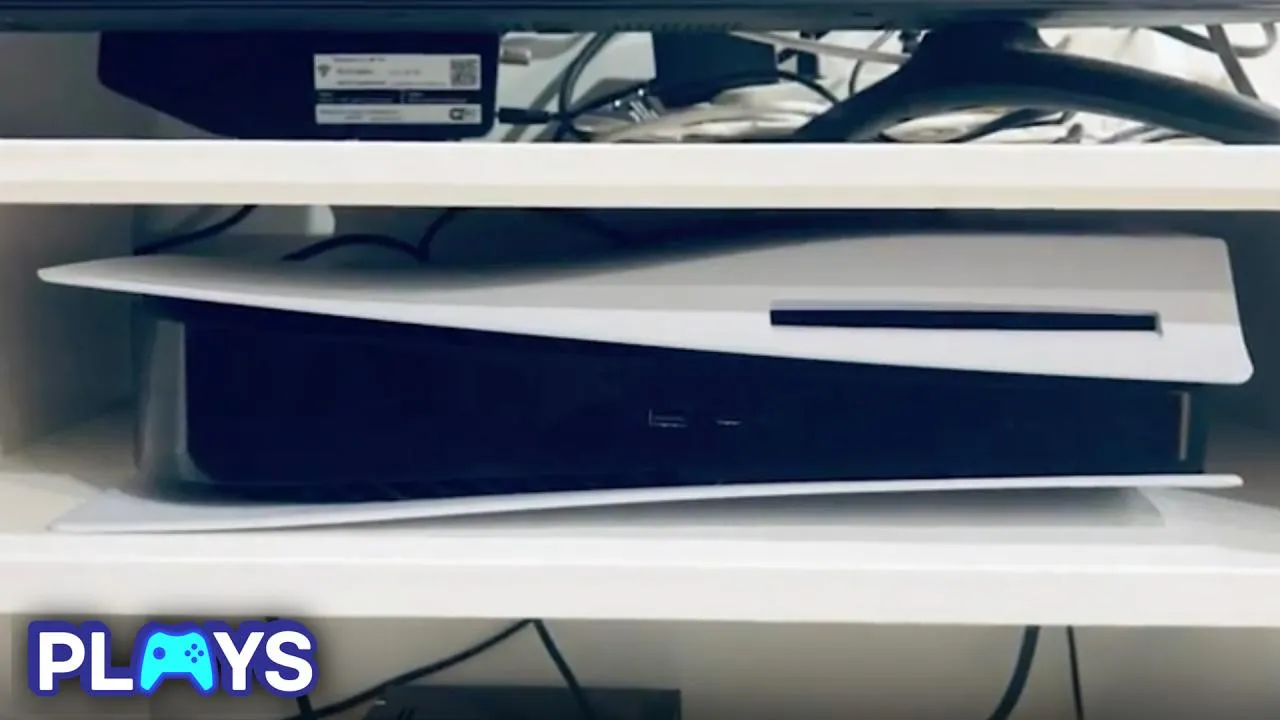
The Secret Orientation
The PlayStation 5 has always had a bit of a weird design quirk. It kinda feels like a space ship, but the fact you need a stand just to keep it stable feels like an odd choice, most consoles don't ask for that. Naturally, people started experimenting, and it turns out there's a way to position it without the stand… just not one Sony officially supports. By laying it horizontally in reverse, with the disc drive side pointing upward, you can actually balance it just fine. In that sense, it almost feels like a better setup. The only catch? If you're using discs, you'll need to insert them upside down, which is easy to forget. There was even a moment where Sony accidentally showed this orientation in an ad before quickly pulling it, which makes you wonder… if it works this well, why wasn't it ever made official? I'm kidding, we know why. Money.
Universal Settings
Every time you start a new game, you're usually hit with the same setup questions, difficulty, subtitles, brightness, and if you're my girlfriend, inverting y AND x, don't ask. Thankfully, the PlayStation 5 has a way to skip a lot of that. If you head into Settings and check out Saved Data and Game/App Settings, you can set up presets so the console automatically picks things like difficulty, performance mode, resolution, subtitles, audio, and even camera preferences for you. Thanks PlayStation, I love you.
Easy to Open Up
There's a surprising amount of design work that goes into consoles and controllers, they're basically functional pieces of art, at least I think so. Sony tends to stick with clean, uniform designs, but players love putting their own spin on things with custom mods. Normally, that kind of tinkering can be a hassle, tiny screwdrivers, and magnifying glass. The DualSense controller makes this a bit easier. The plastic panel on the back can be snapped off without needing any serious tools, giving you quick access to the inside if you want to take a look or make adjustments. Seriously, go look at your controller, not a hole to be seen.
Control Center Helps You
Games have gotten way more complicated over the years, so it's basically inevitable you'll hit a wall at some point. Normally, that means jumping online, scrolling through Reddit threads or watching YouTube tutorials. But the PlayStation 5 actually has a built-in way to help with that. If you've got PlayStation Plus and the game supports it, you can pull up the Control Center with the PS button and get hints or walkthrough-style help without ever leaving the game. It's all provided directly by the developers too, which makes it feel as reliable as it could possibly get.
Screen Sharing
As consoles get more powerful, they're not just improving graphics, they're improving socially. The PlayStation 5 has a feature that lets you share your screen with friends in your party, which is cool on its own, but it goes a step further. You can watch your friend's gameplay while playing your own using picture-in-picture. It's like having a second perspective running at the same time. Me and my buddy used to set up two TV's and play our own games for fun, now we don't have to! (We still will).
3D Audio Without a Headset
When Sony was promoting the PlayStation 5, 3D audio was a big deal, marketed as this next-level immersion that puts you right in the middle of the action. A lot of that advertising also pushed the Pulse 3D Wireless Headset, making it seem like you needed it to get the full experience. But here's the thing, you don't. The PS5 already has 3D audio built in, and you can access it straight from the settings. The headset might be the easiest way to enjoy it, but you can set it up with regular TV speakers too. It just takes a bit more effort, like running the console's acoustic measurement tool to tune everything properly. If you move a chair in your house, you will have to redo it though … Sorry.
Game Boost
One of the best things about the PlayStation 5 is how it handles older games. Most of the PS4 library works through backward compatibility, and while a lot of titles run as they did before, with faster loading thanks to the SSD, some get a noticeable upgrade through something called Game Boost. This feature lets certain games run at higher frame rates and even improved resolutions, making them feel smoother and more modern. It's not automatic across the board though, as developers need to patch their games to support it.
Single Button Mute
This one I just learnt, and it actually helps a LOT. Remote controls always seem to vanish the second you actually need them, usually buried in the couch or hiding somewhere that makes no sense. Luckily, the PlayStation 5 has you covered without needing to grab anything else. The DualSense has a built-in mic and speaker, and that little button under the PS button does more than you might think. Tap it, and you mute your mic. Hold it down, though, and it mutes everything, all audio from the console. A trick that you'll find yourself using more than you'd think.
Plug and Play
The PlayStation 5 might be more powerful than the PS4, but its storage can fill up way faster than you'd expect, especially with how big modern games are. You can move PS5 games onto an external drive to free up space, but you won't be able to actually play them from there, which kind of limits the usefulness. Where external drives really shine is with PS4 games. Unlike PS5 titles, they run perfectly fine straight from an external hard drive, so you can keep your older library there and save your SSD for newer games. You can even set the drive as the automatic download location FOR PS4 games, pretty clever!
Mouse and Keyboard
This was pushed in the early days, but kind of died off after release, with most players who didn't follow initial marketing not even realising it's possible. Those extra ports on the back of the PS5 can actually do a lot more than you think. You can plug in a keyboard and mouse and use them just like you would on a PC, which instantly changes how certain games feel. Even if the ports are already taken, Bluetooth works too, so you're not stuck. It might sound unnecessary since the DualSense does the job for most games, but some titles just play better this way.
PS5 Activities
If you're over the whole process of loading into "Grand Theft Auto V", waiting to get into "GTA Online", then finally joining a friend just to play what you actually wanted, yeah, the PlayStation 5 has a fix for that. It's called Activities, and it basically cuts out all that wasted time. Instead of digging through menus, you can jump straight into specific parts of a game right from the home screen. As lead PlayStation architect Mark Cerny explained, multiplayer games can show you live activities you can instantly join, while single-player games can suggest missions or rewards you can dive into immediately.
Ergonomics
Controller designs can change a lot from one generation to the next, but Sony has mostly stuck to a familiar formula across its consoles. Instead of reinventing everything, they've refined the design over time, and the DualSense is the clearest example of that approach. It's slightly bigger and more rounded than the DualShock 4, which makes it sit more comfortably in your hands during longer sessions. Small tweaks-like shifting the light bar and adjusting the shape, might not seem huge at first, but they add up. The controller was actually designed to be completely ergonomic, which is probably why you feel far less hand cramps during marathon sessions.
Phone Control
The PlayStation 5 isn't exactly something you can take with you, trust me, I've tried. But that doesn't mean you're locked out of managing it when you're away. That's where the PlayStation App comes in. It connects straight to your console and lets you handle a bunch of things remotely, even if you've got multiple systems at home. I know this sounds like an ad, but it's not, I just don't think enough people are utilising this goddamn tool. From the beach, I was able to delete games from my PS5, to make enough room for Crimson Desert, which I also bought and downloaded from the beach … I hate this beach man.
Challenges
The PlayStation 5 has a nice little feature to keep you on track when gaming. When you open the control centre during a single-player game, you'll often see Activity cards pop up, pointing you toward unfinished missions, side content, or even progress toward trophies you haven't unlocked yet. Some of them even estimate how long a task might take based on how you play, which is surprisingly handy. There are also Challenges, which let you compete with friends or even global players, tracking things like speedruns and scores so you can see exactly how you stack up.
Most Successful Launch
The PS5 actually has a pretty surprising record. Even with all the supply shortages early on, the PlayStation 5 still exploded in popularity. Demand was through the roof, and it managed to sell 7.8 million units in its first year alone. That made it the most successful launch period for any PlayStation console ever, which is pretty wild considering how hard it was to actually find one at the time. It just goes to show how strong the hype was, people were willing to wait, refresh pages, and fight through stock drops just to get their hands on it. I however had a best mate who worked at JB Hi-Fi, and I can say this now since he doesn't anymore, I definitely took someone else's pre-order .. My bad.
Add an SSD to Your PS5
This entry is pretty self explanatory, but let's talk about it anyway. Out of the box, you're working with around 667GB of usable space on the PS5, and with some titles pushing past 100GB, that disappears fast. You can move games onto an external drive to clear room, but PS5 games won't run from there, you'll need to copy them back every time, which gets old quickly. That's why adding an internal SSD is the smarter long-term move. It gives you a lot more space to work with and keeps everything running at full speed.
Listen to Music While You Play
A lot of people don't realise this, but the PlayStation 5 lets you play your own music while gaming, which is a game-changer if you're sick of hearing the same soundtrack on loop. Whether you use Spotify or Apple Music, it's super easy to set up. Just download the app from the PlayStation Store, log in, and you're ready. Once you're in a game, hit the PS button to open the Control Center, jump into the Music section, and start playing whatever you want. With games like "Elden Ring", and "Medieval Dynasty", I've zoned out for hundreds of hours listening to podcasts and playing.
Stream PS5 Games to Your Mobile
The PlayStation 5 has a breakthrough feature called Remote Play that basically lets you take your games off the TV and onto your phone, tablet, or PC. So if someone's hogging the screen, you're not stuck waiting around, you can keep playing from another device as long as your internet is solid. To get started, you'll need the PS Remote Play app, which you can grab from your device's app store. After that, just enable Remote Play in your PS5 settings, follow the setup steps, and you're good to go. There's even a dedicated handheld specifically for this called The PlayStation Portal.
Sony WANTS You To Clean
If you've just picked up a new PS5, you won't need to worry about this straight away, but it's something worth keeping in mind down the line. Dust buildup has always been a pain with consoles, usually because cleaning them properly meant taking the whole thing apart. Thankfully, that's not really the case here. Sony actually designed the PlayStation 5 to be easier to maintain, which they showed off in an early teardown before launch. To clean it, you just pop off the side panels and use a vacuum on the built-in dust catchers. That's it. No deep disassembly needed.
Change Your PS5 Covers
Speaking of! Some people love the bold, futuristic look of the PS5, while others think it's a bit over the top compared to the simpler PS4 design. Either way, it stands out. The good news is you're not stuck with the default white finish. You can actually swap out the side covers pretty easily, no tools required. Just pop them off and replace them with something new. Sony even sells official covers in different colours, so you can give your console a fresh look without messing around with custom mods or complicated installs.
Universal Button Controls
Consoles might look the same no matter where you buy them, but games haven't always played by the same rules across regions. In the past, things like region locking and different control schemes made it a bit messy depending on where you were playing. The DualSense actually smooths one of those issues out. Traditionally, the Cross and Circle buttons swapped roles depending on the region, Cross was "confirm" in the West, while Japan used Circle instead. We saw this with PlayStation classics like "Metal Gear Solid". It wasn't a huge deal, but it could definitely throw people off. Now, things are standardised, giving players a consistent setup no matter where they are. It's a small change, but one that unifies us.
Chat With Friends Without a Headset
One of the standout extras on the DualSense is the built-in microphone, which means you can jump into voice chat without needing a headset. It's convenient, you can send voice messages or talk to friends straight away without any extra gear. Unfortunately, it's turned on by default, which means it's very easy to forget it's live and accidentally broadcast whatever's going on around you. To avoid that awkward moment, it's a good idea to change the default setting, which you know from our PREVIOUS entry on it. Good work.
Customize Your Create Button
If you've picked up a DualSense, you've probably noticed the Create button sitting where the old Share button used to be. Don't worry though, it's basically an upgraded version of the same idea. It still lets you grab screenshots and record clips, but with a bit more flexibility. By default, holding it down takes a screenshot, while double-tapping saves a recent gameplay clip. It's quick and easy once you get used to it. The cool part is you're not locked into those controls either. On the PlayStation 5, you can head into the settings and remap how the button works to suit your style. The PS5 continues to be an incredibly customisable experience.
Remap Your Buttons
Most games these days get the controls right, but every now and then you'll run into something that just doesn't feel comfortable, or you might just prefer your own setup anyway. That's where the DualSense really shines. You can head into the settings and fully remap your buttons, whether that means swapping the analog sticks or flipping inputs like Cross and Circle because you're tired of "Metal Gear Solid" .. Sorry to rail on MGS so much Kojima, send me a message. I wanna be in Death Stranding 3.
Use Your Old Dualshock 4
Switching over to the PlayStation 5 doesn't mean you have to ditch your old habits completely. If you were used to the feel of the DualShock 4, you can actually keep using it, but with a small catch, it costs $800 … No, It just won't work with PS5 games, but it's perfectly fine for playing backward-compatible PS4 titles. So if you've got a big library or just prefer that older grip, you're covered. But also, grow up, it's a hiphop world, keep up or get out of the way.
